 ABOUT WHIITEROOM
Discover how Whiiteroom transforms your device into a distraction-free workspace built specifically for your task.
What is Whiiteroom?
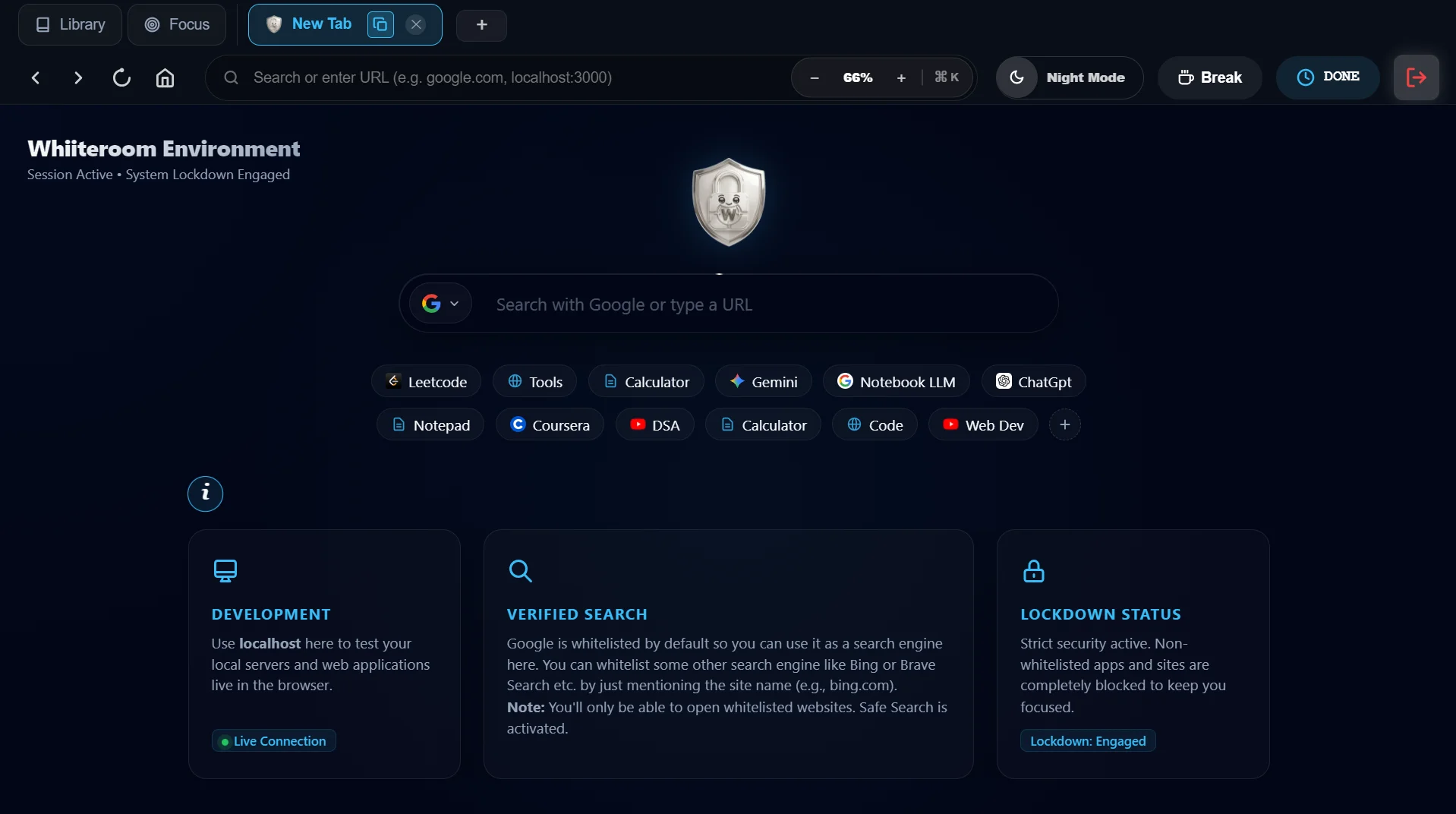
Whiiteroom is a productivity app with its own built-in Whiiteroom Browser that transforms your computer or phone into a distraction-free workspace.
Use Whitelist Mode to build a workspace from scratch with only what you need — or use Blacklist Mode to simply block your known distractions and leave everything else open. Both are built in, both are free.
Before you begin, you choose exactly what you'll need for your task. During your focus session, only the apps, websites, files, and YouTube resources you approved remain available.
Once your session starts, Whiiteroom enforces those decisions for you, so you can focus on your work instead of repeatedly deciding what to avoid.
Whether you're studying for an exam, writing code, researching, designing, or working on an important project, Whiiteroom creates a workspace built specifically for your task, helping you stay focused from start to finish.
.webp)
Pre-Session Account Sign-In
Before launching a focus session, you sign in to your required web accounts (e.g. GitHub, ChatGPT, Google Workspace) right inside the Whiiteroom setup screen. You can sign in with multiple accounts so that Whiiteroom remembers them for your session.
.webp)
Store Applications, Websites & Specific Pages
Whiiteroom doesn't just filter YouTube—it lets you store and manage all your allowed resources in an organized Workspace Library.
.webp)
Main Session Timer & Scheduled Break Timers
Every Whiiteroom session lets you set both your Main Focus Session Timer AND your Scheduled Break Timers before starting.
Main Focus Session Timer
Set your overall work duration (e.g. 25m Pomodoro, 50m deep work block, 90m sprint, or custom duration).
Scheduled Break Timers
Decide when your breaks happen and how long they last (e.g. a 5-minute break every 50 minutes). During breaks, restrictions pause automatically, and when the break ends, Whiiteroom seamlessly resumes your focus session.
.webp)
How Whiiteroom Works
Every Whiiteroom session has two simple stages.
Set Up Your Workspace
Before starting your session, choose everything you'll need.
In Whitelist Mode, you allow:
You also choose:
- • Focus duration
- • Scheduled breaks
- • Focus mode
- • Saved workspace or profile
Start Your Focus Session
When your session begins, Whiiteroom creates a workspace designed only for your current task.
During your session:
A Different Way to Stay Focused
Whitelist Mode
"What do I need for this?"
Build a workspace with only the apps and sites for your task. Everything else is blocked by default — including things you forgot to think about. Maximum control for structured deep work.
Blacklist Mode
"What's wasting my time?"
Block only your known distractions — Reddit, Instagram, Twitter. Everything else stays open for spontaneous research and flexible workflows. Maximum freedom with guardrails.
Real-World Example: Studying Data Structures
For example, if you're studying Data Structures, your workspace might include:
Everything outside that workspace stays unavailable until your session ends.
Smart YouTube Filtering
Many people rely on YouTube for learning, but not every video helps them reach their goal.
Instead of blocking YouTube completely, Whiiteroom lets you choose exactly what you want to access.
During your session, the Whiiteroom Browser removes distractions such as recommendations, Shorts, homepage feeds, comments, and unrelated content, allowing you to focus on the educational content you selected.
Focus Modes
Different tasks require different levels of commitment, so Whiiteroom offers three focus modes.
Everyday Productivity
End your session whenever you want.
Ideal for everyday productivity and lighter focus sessions.
Impulse Control
Need to leave early? Complete a small challenge before ending your session.
The extra step helps reduce impulsive decisions while still keeping you in control.
Full Commitment
Stay committed until your timer ends.
An emergency recovery method is always available if you genuinely need it, but it is intentionally designed to prevent accidental or impulsive exits while ensuring you are never permanently locked out of your own device.
.webp)
Built for Real Focus
Whiiteroom is designed to support your focus from the moment your session begins until it ends.
During an active session:
"The goal isn't to punish you—it's to create an environment where staying focused becomes the easiest choice."
Who is Whiiteroom For?
Whiiteroom is designed for anyone who wants a distraction-free workspace, including:
Students preparing for exams
Software developers
Writers
Researchers
Designers
Professionals
...and anyone who wants to focus on meaningful work without unnecessary distractions.
Why Whiiteroom?
Modern computers and phones give us access to everything we need—but they also make distractions only a click away.
Whiiteroom helps you temporarily transform your device into a workspace designed specifically for the task you're working on.
You decide once before you begin. Whiiteroom takes care of enforcing those decisions, so you can spend your energy on your work instead of constantly deciding what to ignore.
Connect with Founder Archit Singh
Follow the journey, read new product posts, or send feedback directly.